
1.基础游戏:跑酷#
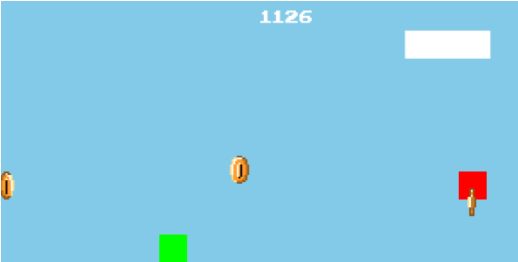
让我们从一个非常基础的游戏开始:一个无限的跑酷游戏。
你应该在谷歌浏览器连接网络失败时玩过恐龙游戏。
这个案例与之相同,只是用矩形和硬币代替原本的素材。
初始化项目#
这个初始化文件包含了Phaser游戏的基本配置:在这里我们定义了游戏中的场景(比如开场动画、游戏场景、游戏结束场景等),并配置了屏幕大小、位置、物理类型等。
src/main.js
import Phaser from "phaser";
import Game from "./scenes/game";
import GameOver from "./scenes/gameover";

// 这是游戏的主要配置文件
const config = {
  width: 600,
  height: 300,
  scale: {
    mode: Phaser.Scale.FIT,
    autoCenter: Phaser.Scale.CENTER_BOTH,
  },
  autoRound: false,
  parent: "game-container",
  physics: {
    default: "arcade",
    arcade: {
      gravity: { y: 350 },
      debug: true,
    },
  },
  scene: [Game, GameOver],
};

const game = new Phaser.Game(config);
在开发阶段,建议将调试模式设置为 true,这样我们就能看到带有物理属性的任何游戏对象的轮廓。
玩家代码#
这是表示玩家的类。它扩展了一个非常基础的 Phaser 游戏对象:一个矩形。在构造函数中设置玩家,为其提供物理属性,包括身体和重力。
src/gameobjects/player.js
class Player extends Phaser.GameObjects.Rectangle {
  constructor(scene, x, y, number) {
    super(scene, x, y, 32, 32, 0x00ff00);
    this.setOrigin(0.5);
    this.scene.add.existing(this);
    this.scene.physics.add.existing(this);
    this.body.collideWorldBounds = true;
    this.setScale(1);
    this.jumping = false;
    this.invincible = false;
    this.health = 10;
    this.body.mass = 10;
    this.body.setDragY = 10;
  }
}

export default Player;
这个“玩家”现在还很糟糕,但不用担心,随着开发的推进,我们会看到生动有趣的角色。
生成障碍物、金币和云朵#
这个游戏是一个简单的无限跑酷游戏,玩家(绿色矩形)需要避开障碍物并收集硬币。这些元素是随机生成的。
src/gameobjects/generator.js
export default class Generator {
  constructor(scene) {
    this.scene = scene;
    this.scene.time.delayedCall(2000, () => this.init(), null, this);
    this.pinos = 0;
  }

  init() {
    this.generateCloud();
    this.generateObstacle();
    this.generateCoin();
  }

  // 这是生成云朵的函数。它创建一个新的云朵,然后在随机的时间后再次调用自身。
  // 这是通过Phaser的 time.delayedCall 函数实现的。
  generateCloud() {
    new Cloud(this.scene);
    this.scene.time.delayedCall(
      Phaser.Math.Between(2000, 3000),
      () => this.generateCloud(),
      null,
      this
    );
  }

  generateObstacle() {
    this.scene.obstacles.add(
      new Obstacle(
        this.scene,
        800,
        this.scene.height - Phaser.Math.Between(32, 128)
      )
    );
    this.scene.time.delayedCall(
      Phaser.Math.Between(1500, 2500),
      () => this.generateObstacle(),
      null,
      this
    );
  }

  generateCoin() {
    this.scene.coins.add(
      new Coin(
        this.scene,
        800,
        this.scene.height - Phaser.Math.Between(32, 128)
      )
    );
    this.scene.time.delayedCall(
      Phaser.Math.Between(500, 1500),
      () => this.generateCoin(1),
      null,
      this
    );
  }
}

// 这是一个表示云朵的游戏对象。它是一个具有随机大小和位置的简单矩形。我们使用补间动画将其从右向左移动,当它移出屏幕时将其销毁。
class Cloud extends Phaser.GameObjects.Rectangle {
  constructor(scene, x, y) {
    const finalY = y || Phaser.Math.Between(0, 100);
    super(scene, x, finalY, 98, 32, 0xffffff);
    scene.add.existing(this);
    const alpha = 1 / Phaser.Math.Between(1, 3);

    this.setScale(alpha);
    this.init();
  }

  init() {
    this.scene.tweens.add({
      targets: this,
      x: { from: 800, to: -100 },
      duration: 2000 / this.scale,
      onComplete: () => {
        this.destroy();
      },
    });
  }
}

// 这是一个表示障碍物的游戏对象。它的工作方式与云朵完全相同,但它是一个红色矩形,是我们在game场景中创建的障碍物组的一部分。如果玩家碰到它,它会导致玩家死亡。
class Obstacle extends Phaser.GameObjects.Rectangle {
  constructor(scene, x, y) {
    super(scene, x, y, 32, 32, 0xff0000);
    scene.add.existing(this);
    scene.physics.add.existing(this);
    this.body.setAllowGravity(false);
    const alpha = 1 / Phaser.Math.Between(1, 3);

    this.init();
  }

  init() {
    this.scene.tweens.add({
      targets: this,
      x: { from: 820, to: -100 },
      duration: 2000,
      onComplete: () => {
        this.destroy();
      },
    });
  }
}

// 这是一个表示硬币的游戏对象。它是一个动画精灵,属于我们在game场景中创建的硬币组。它的移动方式与之前的云朵和障碍物对象相同。
// 如果玩家碰到它,可以增加玩家的分数。
class Coin extends Phaser.GameObjects.Sprite {
  constructor(scene, x, y) {
    super(scene, x, y, "coin");
    scene.add.existing(this);
    scene.physics.add.existing(this);
    this.body.setAllowGravity(false);
    const alpha = 1 / Phaser.Math.Between(1, 3);

    this.init();
  }

  init() {
    this.scene.tweens.add({
      targets: this,
      x: { from: 820, to: -100 },
      duration: 2000,
      onComplete: () => {
        this.destroy();
      },
    });

    const coinAnimation = this.scene.anims.create({
      key: "coin",
      frames: this.scene.anims.generateFrameNumbers("coin", {
        start: 0,
        end: 7,
      }),
      frameRate: 8,
    });
    this.play({ key: "coin", repeat: -1 });
  }
}
我们可以调整这个生成器,以便随着游戏的进展增加难度。
游戏场景#
这是游戏场景本身!和其他Phaser场景对象一样,它使用三个主要方法:
preload:在这里加载游戏资源:图像、精灵、字体、声音、地图等。create:在这里实例化并启动游戏元素,如玩家、敌人或障碍物生成器。此外,还在这里定义障碍物、硬币和云朵的组,并且最重要的是:定义这些组在触碰到玩家时的行为。update:游戏循环。Phaser会重复调用这个方法,我们可以在这里处理玩家输入。
src/scenes/game.js
import Player from "../gameobjects/player";
import Generator from "../gameobjects/generator";

export default class Game extends Phaser.Scene {
  constructor() {
    super({ key: "game" });
    this.player = null;
    this.score = 0;
    this.scoreText = null;
  }

  init(data) {
    this.name = data.name;
    this.number = data.number;
  }

  // 我们使用preload方法来加载游戏所需的所有资源。
  // 同时,我们将分数设置为0并存储在注册表中,以便从其他场景中访问它。
  preload() {
    this.registry.set("score", "0");
    this.load.audio("coin", "assets/sounds/coin.mp3");
    this.load.audio("jump", "assets/sounds/jump.mp3");
    this.load.audio("dead", "assets/sounds/dead.mp3");
    this.load.audio("theme", "assets/sounds/theme.mp3");
    this.load.spritesheet("coin", "./assets/images/coin.png", {
      frameWidth: 32,
      frameHeight: 32,
    });
    this.load.bitmapFont(
      "arcade",
      "assets/fonts/arcade.png",
      "assets/fonts/arcade.xml"
    );
    this.score = 0;
  }

  /**
   * 在这里我们做了几个事情:
   * - 我们使用 create 方法来初始化游戏。
   * - 设置一些变量来存储可能稍后需要的宽度和高度。
   * - 设置背景颜色,并创建玩家、障碍物和硬币。
   * - 创建键盘输入监听空格键。
   * - 添加玩家与障碍物之间的碰撞检测,以及玩家与硬币之间的重叠检测。关键部分是设置当玩家与硬币重叠或碰到障碍物时调用的函数。
   */
  create() {
    this.width = this.sys.game.config.width;
    this.height = this.sys.game.config.height;
    this.center_width = this.width / 2;
    this.center_height = this.height / 2;

    this.cameras.main.setBackgroundColor(0x87ceeb);
    this.obstacles = this.add.group();
    this.coins = this.add.group();
    this.generator = new Generator(this);
    this.SPACE = this.input.keyboard.addKey(
      Phaser.Input.Keyboard.KeyCodes.SPACE
    );
    this.player = new Player(this, this.center_width - 100, this.height - 200);
    this.scoreText = this.add.bitmapText(
      this.center_width,
      10,
      "arcade",
      this.score,
      20
    );

    this.physics.add.collider(
      this.player,
      this.obstacles,
      this.hitObstacle,
      () => {
        return true;
      },
      this
    );

    this.physics.add.overlap(
      this.player,
      this.coins,
      this.hitCoin,
      () => {
        return true;
      },
      this
    );

    this.loadAudios();
    this.playMusic();

    // 我们使用 pointerdown 事件来监听鼠标点击或触摸事件。
    this.input.on("pointerdown", (pointer) => this.jump(), this);

    // 我们使用 updateScoreEvent 每隔100毫秒更新一次分数,以便玩家在存活期间能够看到分数的不断增加。
    this.updateScoreEvent = this.time.addEvent({
      delay: 100,
      callback: () => this.updateScore(),
      callbackScope: this,
      loop: true,
    });
  }

  // 这个方法在玩家碰到障碍物时被调用。我们停止 updateScoreEvent,以使分数不再增加。
  // 显然,我们还会结束当前场景。
  hitObstacle(player, obstacle) {
    this.updateScoreEvent.destroy();
    this.finishScene();
  }

  // 这个方法在玩家碰到硬币时被调用。我们播放一个声音,更新分数,并销毁硬币。
  hitCoin(player, coin) {
    this.playAudio("coin");
    this.updateScore(1000);
    coin.destroy();
  }

  // 我们使用 loadAudios 方法来加载游戏所需的所有音频文件。
  // 然后我们会使用 playAudio 方法来播放这些音频。
  loadAudios() {
    this.audios = {
      jump: this.sound.add("jump"),
      coin: this.sound.add("coin"),
      dead: this.sound.add("dead"),
    };
  }

  playAudio(key) {
    this.audios[key].play();
  }

  // 这个方法专门用于音乐。我们使用它来循环播放主题音乐。
  playMusic(theme = "theme") {
    this.theme = this.sound.add(theme);
    this.theme.stop();
    this.theme.play({
      mute: false,
      volume: 1,
      rate: 1,
      detune: 0,
      seek: 0,
      loop: true,
      delay: 0,
    });
  }

  // 这是游戏循环。该函数在每一帧调用。
  // 在这里我们可以检查是否按下了某个键或玩家的状态,并做出相应的处理。我们使用 update 方法来检查玩家是否按下了空格键。
  update() {
    if (Phaser.Input.Keyboard.JustDown(this.SPACE)) {
      this.jump();
    } else if (this.player.body.blocked.down) {
      this.jumpTween?.stop();
      this.player.rotation = 0;
      // ground
    }
  }

  // 这是我们用来让玩家跳跃的方法。跳跃只需在Y轴上施加一个速度,重力会完成其余的工作。
  // 我们还播放了跳跃的声音,并添加了一个补间动画,使玩家在跳跃时旋转。
  jump() {
    if (!this.player.body.blocked.down) return;
    this.player.body.setVelocityY(-300);

    this.playAudio("jump");
    this.jumpTween = this.tweens.add({
      targets: this.player,
      duration: 1000,
      angle: { from: 0, to: 360 },
      repeat: -1,
    });
  }

  /**
   * 游戏场景结束时时,我们应该:
   * - 停止主题音乐
   * - 播放死亡音效
   * - 将分数设置到注册表中,以便在 gameover 场景中显示
   * - 启动 gameover 场景
   */
  finishScene() {
    this.theme.stop();
    this.playAudio("dead");
    this.registry.set("score", "" + this.score);
    this.scene.start("gameover");
  }

  // 这个方法每隔100毫秒调用一次,用于更新分数并在屏幕上显示。
  updateScore(points = 1) {
    this.score += points;
    this.scoreText.setText(this.score);
  }
}如果玩家死亡,我们将分数存储起来,并打开接下来的场景:GameOver。
游戏结算场景#
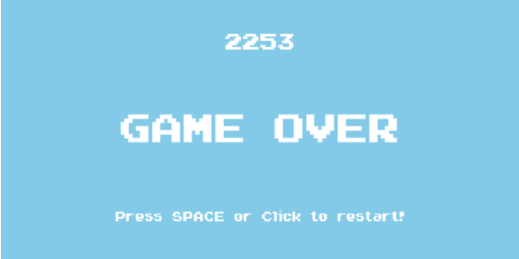
当用户失败时,我们展示这个场景。它相当简单:
我们展示用户的最终得分,并设置一个输入监听器,当用户点击时,我们将他送回游戏场景。
src/scenes/gameover.js
export default class GameOver extends Phaser.Scene {
  constructor() {
    super({ key: "gameover" });
  }

  create() {
    this.width = this.sys.game.config.width;
    this.height = this.sys.game.config.height;
    this.center_width = this.width / 2;
    this.center_height = this.height / 2;

    this.cameras.main.setBackgroundColor(0x87ceeb);

    this.add
      .bitmapText(
        this.center_width,
        50,
        "arcade",
        this.registry.get("score"),
        25
      )
      .setOrigin(0.5);
    this.add
      .bitmapText(
        this.center_width,
        this.center_height,
        "arcade",
        "GAME OVER",
        45
      )
      .setOrigin(0.5);
    this.add
      .bitmapText(
        this.center_width,
        250,
        "arcade",
        "Press SPACE or Click to restart!",
        15
      )
      .setOrigin(0.5);
    this.input.keyboard.on("keydown-SPACE", this.startGame, this);
    this.input.on("pointerdown", (pointer) => this.startGame(), this);
  }

  showLine(text, y) {
    let line = this.introLayer.add(
      this.add
        .bitmapText(this.center_width, y, "pixelFont", text, 25)
        .setOrigin(0.5)
        .setAlpha(0)
    );
    this.tweens.add({
      targets: line,
      duration: 2000,
      alpha: 1,
    });
  }

  startGame() {
    this.scene.start("game");
  }
}
即使在像这样的简单游戏中,提供一定的挑战也是重要的,所以你必须在这个屏幕上显示分数来让玩家获得成就感。
类似游戏#
源码地址看不了可以去gitee 仓库中翻翻
目录